Ex 1.4 — The Two Spreadsheets 🧹 (bonus ++)
Goal: new sign-ups in spreadsheet A get copied into the CRM (spreadsheet B) — without ever creating a duplicate. Mode: individual · Bonus ++: the hardest one of the day. If you finish it, you've understood n8n's most subtle concept.
What you'll learn: bulk items, comparing two datasets, and the universal truth: real data is dirty.
🐛 No hidden bug this time — the DATA is the bug
The skeleton is clean. But the spreadsheets we gave you are filled in like real life: duplicates, random capitalization (ACME vs Acme), invisible trailing spaces, one half-empty row. Your workflow has to survive that. No hint will tell you where the traps are: open the data and LOOK at it. That's today's skill.
Step 0 — Open the skeleton
Already in your instance: open Ex 1.4 — Les Deux Tableurs (don't import it again, you'd get a duplicate; backup: deux-tableurs.json) → 4 nodes, all disconnected: Manual Trigger, Read A (sign-ups), Read B (CRM), Add to B. The whole wiring is missing — that's your job, starting with connecting the Trigger to both reads (Trigger → Read A AND Trigger → Read B, one output going to two nodes).
Your two test spreadsheets: the tabs 1.4 — Inscriptions and 1.4 — CRM of YOUR sheet (link on your portal card). The 3 Google Sheets nodes already point at it: Document By ID = {{ $env.WORKSHOP_SHEET_ID }} (or By URL = the link on your card).
Why a Manual Trigger, when 1.1 and 1.3 didn't need one to test a single node?
Here you're going to wire two different reads into the same node (Compare Datasets). If you run Read A then Read B separately with each one's Execute step button, n8n only keeps one result in memory at a time — the second overwrites the first. The Manual Trigger + the Execute workflow button (top of the canvas) re-runs both reads in the same pass, so Compare Datasets receives both fresh results at once.
CP1 — You see both datasets
Wire Trigger → Read A and Trigger → Read B (one output, two branches). Click Execute workflow (not Execute step on each node — read the box above if you're not sure why). Look at the OUTPUT of Read A and Read B. How many sign-ups? How many already in the CRM? Spot by eye what's going to cause trouble (there are at least 3 traps).
✅ Done when: you can say out loud which rows in A are actually new. → CP1.
CP2 — The machine compares them
- Find the Compare Datasets node and wire
Read A+Read Binto it. - Comparison field:
email(it's the least-bad identifier — names, on the other hand, get spelled differently). - Execute workflow (still from the trigger, not node by node) and look at the node's 4 outputs. The one you care about: "In A only" = the actual new sign-ups.
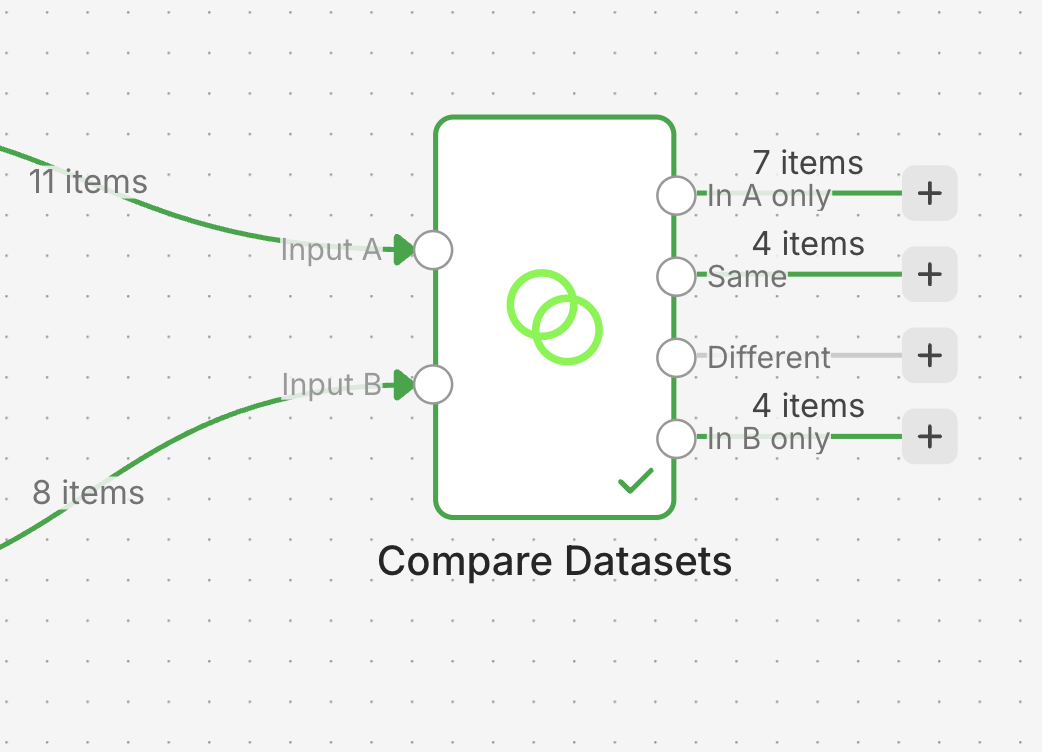
✅ Done when: "In A only" contains items. → CP2. But check: is the count RIGHT? (Spoiler: probably not. CP3.)
Hint 1
The node asks you to wire two inputs, A and B. Order matters: A = the source, B = what already exists.
CP3 — Getting the count right (cleanup)
MARIE@acme.fr and marie@acme.fr are the same person to you — not to a computer. You need to normalize before comparing:
- Insert an Edit Fields node after each read (A and B).
- Rewrite
emailin a clean form: lowercase + no spaces. Two functions chained together:{{ $json.email.toLowerCase().trim() }} - Execute workflow again. The count in "In A only" should now match what you saw by eye in CP1.
✅ Done when: the machine's count = your human count from CP1. → CP3.
Hint 1
Count by hand: how many rows in A have an email that TRULY doesn't exist in B, once you ignore capitalization and spaces? That's your target number.
Hint 2
The row with no email? Decide its fate explicitly (a Filter before the comparison: email not empty). An automation that doesn't decide will crash one day at the worst possible time.
CP4 — The sync runs, twice
- Wire "In A only" →
Add to B. Execute: the new ones enter the CRM. - The real test: re-run the entire workflow a SECOND time.
✅ Done when: the second run adds NOTHING (0 items in "In A only"). That's what "no duplicates" really means: not "it worked once," but "I can run it a thousand times." → CP4, exercise done: check it off on the progress board. 👑
You just finished the Day 1 boss fight
This pattern — read two sources, normalize, compare, only write the difference, be safely re-runnable — is the skeleton of half the enterprise automations in the real world. You just built it. Go tell everyone at the 5pm stand-up.